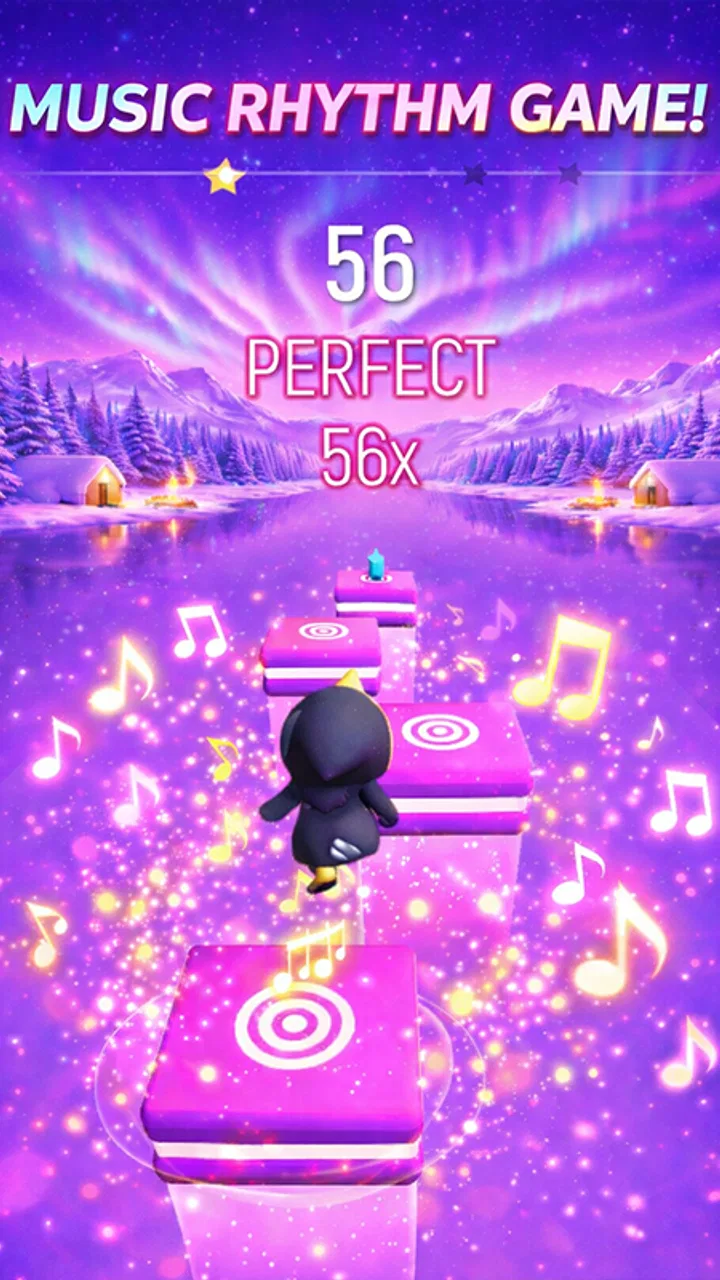
Tiles Dance Gugu Gaga Penguin
- 0.0
- Rating
- 50.00K
- Installs
- Free
- Price

 Analysis by App-foxy
I found Tiles Dance Gugu Gaga Penguin most interesting as a small, approachable music game for a shared phone or tablet rather than as a serious rhythm-training tool. The idea is easy to understand: follow the musical flow by interacting with dancing tiles, with the Gugu Gaga Penguin theme providing the character and atmosphere. That simplicity makes it suitable for quick turns, especially when a child wants to show an adult how to play or when several people are passing one device around.
My first impression is that the game aims for immediate fun instead of a complicated progression system. You do not need to learn a large set of rules before trying it. That matters in a household setting, where the person holding the device may change every few minutes and nobody wants to spend the whole session explaining menus. At the same time, the simple concept also sets a limit: players looking for deep rhythm mechanics, extensive customization, or a long competitive journey may find the experience too lightweight.
How it works in a shared household
The strongest everyday use case is a short shared session. Imagine a child waiting at home while an older sibling finishes another task, or a parent looking for something brief to play together without creating a complicated account setup. One person can take a turn, hand over the device, and let the next player try. Because the central action is based on keeping up with tiles and music, the game is naturally easy to demonstrate face to face.
You May Also Like

 Pandora - Music & Podcasts
Pandora’s Music Is Easy to Start, but Harder to Recover
Pandora’s strength is its low-effort path from a seed to a station. Its weak spot is how much confidence it asks you to place in connection, setup, and quiet recovery.

 AccuWeather: Weather Radar
AccuWeather Review: A Quick, Clear Forecast for Everyday Decisions
For everyday plans, the best forecast is the one you can understand quickly. AccuWeather makes rain timing, radar, and local conditions easy to act on, with a few trade-offs.

 Hill Climb Racing
Why Hill Climb Racing Still Turns Crashes Into One More Run
A tiny car, a bumpy hill and one more upgrade: Hill Climb Racing keeps resurfacing because its simple chaos makes every near-miss feel personal.

 AliExpress - Shopping App
AliExpress Makes Global Shopping Feel Personal, but Shoppers Bear the Risk
AliExpress turns a global marketplace into a pocket-sized discovery engine. Its reach is useful, its shopping loop compelling, and its trade-offs easy to miss.

 Lords Mobile: Kingdom Wars
Lords Mobile Is a Kingdom-Building Routine, Not a Quick Match
A case-by-case verdict on the building, battles, device demands, and social commitments that make Lords Mobile rewarding for some players and exhausting for others.

 PDF Scanner app - TapScanner
TapScanner Makes Paperwork Easier to Capture, Check, and Share
TapScanner makes scanning with a phone feel less like a rescue operation and more like a dependable step in getting work done. Its capture tools are useful, though not flawless.
More From Our News Desk
View All News


I would use it in the same way I use other quick casual games: as a five-minute activity between longer tasks, not as the main entertainment for an entire evening. The penguin presentation gives the game a friendly identity, while the music focus makes it feel more active than a static puzzle. For a child, the appeal is likely to come from the combination of movement, sound, and recognizable visual feedback rather than from a complex story.
That shared-device role comes with a practical trade-off. A rhythm game is more enjoyable when the player can hear the beat clearly and concentrate on the screen. In a busy room, several people talking at once can make timing harder. I would therefore choose a quieter corner, keep the device at a comfortable angle, and agree on short turns before starting. This is not a fault unique to this title, but it is especially relevant when the game is being used socially rather than privately.
Another useful approach is to let the youngest player demonstrate first. Instead of taking over immediately, an adult can watch the pattern and ask the child to explain what to do. That turns a very small game into a cooperative activity and avoids making the experience feel like a test. If the player misses a beat, I would treat it as part of the fun rather than correcting every move. The game works better as a shared musical toy than as a lesson in perfect performance.
What to expect before installing
Tiles Dance Gugu Gaga Penguin is a free game in the music category, developed by Satosu Games. Its age classification is Everyone, which makes it a reasonable candidate for a family device when the household is comfortable with the game itself. The current version is 1, and it runs on devices using Android 7.1 or later. Those details make it accessible to people who keep an older Android phone or tablet instead of replacing it frequently.
The installation decision is fairly simple for a household: check the device’s Android version, make sure the audio is available, and decide who will use the game. A shared device should ideally have enough battery for casual play and should not be needed for an urgent call or school task. Since the game is free, the financial barrier is low, but free does not automatically mean every family will want it on every device. Storage space, sound in public areas, and screen-time expectations still matter.
I would also establish a clear boundary around the device before handing it over. For example, a parent might say that the game is available after homework, during a waiting period, or for a limited turn. The important point is that this boundary comes from the household routine, not from assuming the game will manage it for you. A casual music title can be easy to start and surprisingly difficult to stop when a player wants to improve the next attempt.
Because the game is free, it can be tempting to install it quickly and leave it available to everyone. I prefer a more deliberate setup on a shared phone: place it where the intended users can find it, explain that it is a turn-taking game, and avoid presenting it as an unlimited reward. That small amount of planning reduces arguments and makes the game feel like a shared activity rather than another source of screen-time negotiation.
Coordination matters more than competition
The most useful household strategy is to coordinate turns before the music starts. A simple rotation works well: one player tries a session, the next player follows, and everyone watches without interrupting. This is better than grabbing the device whenever someone misses a tile. In my experience, casual games become more enjoyable when the group agrees that mistakes are expected and that every player gets an uninterrupted attempt.
For younger users, an adult can help with the first interaction without turning the session into constant coaching. I would explain the basic goal once, then let the child discover the timing. If the player is struggling, the most helpful support is usually to reduce distractions, improve the listening environment, or demonstrate one short sequence. Reaching for the screen every few seconds can make the child dependent on assistance and can remove the satisfaction of learning the rhythm independently.
A useful variation is to make the session about listening rather than winning. Ask the player to notice whether the tiles seem to follow the music, then let them try again with that idea in mind. This gives the game a small learning angle without claiming that it is an educational product. It also helps an adult participate even if they are not naturally good at rhythm games. The focus becomes shared attention and timing, not a contest between generations.
There is a clear limitation here: the usefulness of coordination depends on the people around the device. I would not expect the game itself to solve disputes over turns, establish household rules, or replace supervision. If several children are using one tablet, an adult may need to manage the rotation. That is not a reason to avoid the game, but it is an important distinction between a suitable shared activity and a fully managed family platform.
For a single player, I would suggest setting a small personal goal before beginning. The goal might be to stay focused through one attempt, improve timing on a familiar section, or simply complete a session without rushing. This makes the game more satisfying than repeatedly tapping without purpose. It also keeps the experience short enough for a household routine where the device must be returned promptly.
Age context and trust
The Everyone rating makes the game easier to consider for mixed-age use, especially when a parent wants a music-themed activity without an obviously mature presentation. The penguin theme supports that gentle first impression. Still, an age label is only one part of a family decision. Parents know their child’s sensitivity to sound, excitement, frustration, and screen time better than any store category can show.
I would introduce it to a younger child while nearby, particularly during the first session. That is not because the basic idea is difficult, but because the child may need help understanding when to stop, how to share the device, or what to do after a missed sequence. Watching the first few turns also tells an adult whether the music and pace suit that particular child. A game can be age-appropriate in general and still be a poor fit for one child’s temperament.
Trust is also about the device itself. On a phone used by several people, I would keep the child’s access within the normal household rules and make sure they know which device functions are off-limits. I would not assume that installing a free game means the device should be handed over without supervision. The game may be simple, but shared phones often contain personal messages, photos, and work information that have nothing to do with the game.
For older children and adults, the question is less about basic suitability and more about depth. Someone who enjoys quick musical challenges may appreciate the immediate style. Someone who wants a demanding rhythm catalogue, advanced difficulty options, detailed performance records, or a strong long-term progression loop should compare it with more established rhythm games before deciding. Tiles Dance Gugu Gaga Penguin is better approached with modest expectations: a friendly, focused diversion rather than a complete music-game hobby.
The rating shown for the game is currently 0.0, while the title has reached over 50 thousand installs. I would read those figures cautiously rather than treating either one as a final judgment. A displayed average with no meaningful review history does not tell me how well the game fits a particular household, and an install count shows reach rather than quality. My own decision would rest more on the game’s simple concept, device compatibility, and whether the family wants a short music activity.
Where it fits among music games
Compared with a traditional rhythm game built around a large song catalogue, Tiles Dance Gugu Gaga Penguin appears more approachable and less intimidating. A newcomer can understand the basic interaction quickly, and the penguin theme gives it a playful personality. That makes it a better starting point for a child or casual player who may be put off by dense menus, complicated scoring systems, or a highly competitive presentation.
The trade-off is variety and longevity. A specialist rhythm game may offer more ways to practice, more demanding patterns, or a stronger reason to return over many weeks. If your household already enjoys music games and wants a serious challenge, I would choose the deeper alternative. If you want something that can be explained in a minute and enjoyed in short shared turns, this title has a clearer advantage.
It also differs from ordinary casual games because the music is part of the interaction rather than just background decoration. That can make a short session feel more involving, but it means the environment matters more. A silent puzzle can be played while someone is watching television; a tile-and-beat game may be frustrating when the sound is drowned out. I would choose this one for a focused moment, not for a noisy room where the player cannot follow the musical cues.
Another comparison is with passive children’s entertainment. A video can occupy a child without requiring much interaction, while this game asks for attention and timing. That is a strength when an adult wants the child to do something rather than simply watch. It is not necessarily better for every situation, though. During a quiet waiting room visit, sound may be inappropriate, and a silent activity could be the more considerate choice.
Small habits that improve the experience
I would begin with the volume low and raise it only as needed. This protects the comfort of everyone nearby and gives the player time to decide whether the beat is easy to follow. On a shared tablet, placing the device on a stable surface can also help younger players avoid accidental movement while tapping. These are simple adjustments, but they make a bigger difference than trying to force a distracted player through repeated attempts.
Keep the first session short. A child who is still learning the interaction may become frustrated if an adult keeps asking for one more try. Ending after a positive attempt gives the game a better place in the household routine. Later, the player can return with a clearer idea of what they want to improve. This approach is particularly useful when the game is being used as a transition activity before dinner, bedtime, or another scheduled task.
I would also avoid judging the game by one rushed attempt on an old device. Since it supports Android 7.1 and later, it can be considered for older hardware, but the overall experience still depends on the particular phone or tablet, its speaker, and the condition of its screen. If timing feels uncomfortable, first check the environment and the device position before deciding that the player lacks ability. A fair trial should happen when the player can see and hear comfortably.
For households with several users, choose one person to handle installation and basic device preparation. That prevents accidental changes to the shared setup and keeps the game easy to locate. After that, let the players manage their own turns. The goal is not to create a formal system around a tiny game; it is simply to remove avoidable friction so the music and tile interaction remain the center of the session.
My household verdict
I see Tiles Dance Gugu Gaga Penguin as a pleasant option for a family or shared-device situation where the priority is quick, friendly music play. The free price removes the need for a purchase decision, the Everyone classification makes it easier to consider for mixed ages, and the Android 7.1 minimum keeps it relevant to some older devices. Satosu Games has chosen a direct concept that can be introduced without a long explanation.
My recommendation is strongest for casual players, younger users with an adult nearby, and households that enjoy passing one device around for brief turns. I would use it after setting expectations about volume, time, and sharing. The best sessions are likely to be cooperative: one person plays, another listens, and everyone treats missed tiles as part of learning the rhythm.
I would skip it if you are specifically searching for a deep rhythm system, a broad music library, or a long-term competitive game. I would also choose something else when the device must stay silent or when the household wants an activity that can run unattended. The game’s simplicity is its appeal, but it is also the reason it may not satisfy experienced rhythm players.
Overall, I think it earns a place as a low-pressure shared activity rather than as a major game installation. The right way to enjoy it is to keep the session short, make the turn-taking clear, and let the music guide the play instead of chasing perfect results. With those expectations, the penguin theme and tile-based rhythm make a small, accessible choice for a household looking for a little musical fun.
FAQs for Tiles Dance Gugu Gaga Penguin
01What is Tiles Dance Gugu Gaga Penguin about?
Tiles Dance Gugu Gaga Penguin is a rhythm-based game where players guide a cute penguin character across a series of tiles to the beat of catchy tunes. The game combines music and action, challenging players to tap the tiles in sync with the rhythm. It offers a fun and engaging experience for music and game lovers.
02Which platforms is Tiles Dance Gugu Gaga Penguin available on?
Tiles Dance Gugu Gaga Penguin is available for both Android and iOS devices. Users can download it from the Google Play Store for Android devices and the Apple App Store for iOS devices. Ensure your device meets the necessary requirements for optimal performance.
03Does Tiles Dance Gugu Gaga Penguin require an internet connection?
Tiles Dance Gugu Gaga Penguin can be played offline, making it a great option for entertainment on the go. However, certain features, such as downloading additional songs or accessing leaderboards, may require an internet connection to function properly.
04Are there in-app purchases in Tiles Dance Gugu Gaga Penguin?
Yes, Tiles Dance Gugu Gaga Penguin offers in-app purchases. These purchases can enhance the gameplay experience by unlocking new songs, characters, or other features. While the game is free to download, these optional purchases can provide additional content and customization options.
05Is Tiles Dance Gugu Gaga Penguin suitable for children?
Tiles Dance Gugu Gaga Penguin is designed to be family-friendly and suitable for players of all ages. The game features colorful graphics and simple mechanics that are easy to learn. Parents may want to supervise in-app purchases if children are playing, to ensure spending is managed appropriately.
Pros
- Engaging rhythm gameplay.
- Cute penguin-themed visuals.
- Variety of dance tracks.
- Easy to learn controls.
- Suitable for all ages.
Cons
- In-app purchases required.
- Limited track selection initially.
- Ads can be intrusive.
- Requires internet connection.
- Occasional lag on older devices.

Tiles Dance Gugu Gaga Penguin
Gallery